– Mousetrack.exe
Mousetrack, this lightweight macro tool, developed by Yasa LTD, allows you to record your mouse movements and clicks, then automatically replay them in a loop until manually stopped.
Installation Instructions:
- [Download Mousetrack.exe tool here].
- [Download and install AutoHotkey V2 – Library here.]
- Extract the contents of the
.rarfile. - Right-click the
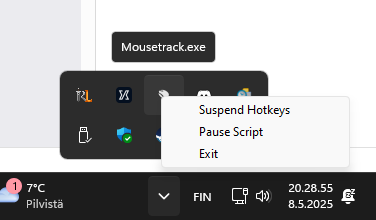
.exefile and select Run as administrator. - The program will appear in your system tray.
How to Use:
F9 — Start recording mouse movements and clicks.
F10 — Stop recording.
F11 — Start looping the recorded actions.
PageUp – button — Stop all activity.
You can repeat the recorded movements and clicks with F11 until a new recording is made.
Use Cases:
This tool. paired with AutoHotkey V2, is a very basic mouse macro recorder and repeater.
AutoHotkey v2 aims to improve the usability and convenience of the language and command set by sacrificing backward compatibility. As such, scripts written for v1 generally will not work without changes on v2.
The syntax is overall more consistent, with much fewer quirks and traps, and many other improvements have been made.
Here are several ways you can use it:
- Great for tasks like repeatedly clicking a button in software (e.g., in data entry or testing interfaces).
- Automate form submissions or navigation sequences in software that doesn’t allow scripting.
- Automate click-heavy actions (like grinding or resource gathering in idle or MMORPG games), but be sure it complies with the game’s terms of service.
- Simulate user behavior during UI testing.
- Test performance of mouse-based workflows or input reliability.
- Automatically open and close programs or organize windows.
- Repetitively adjust settings or click through menu options in creative tools.
The macro is generally undetectable by game services because it simulates basic human-like mouse movements and clicks at the system level, rather than injecting code or modifying the game client. Since it doesn’t interact directly with the game’s memory or files, anti-cheat systems often see it as regular user input.
However, it’s important to note that some advanced anti-cheat systems may still detect patterns or behaviors that look automated, so using such tools in online games can carry a risk of penalties or bans
Need further help?
Need assistance? We will help set everything up.
We share our plugins and programs for free!